Subscribe:

Pages

LinkWithin

Related Posts Plugin for WordPress, Blogger...
Showing posts with label usb. Show all posts

Tuesday, July 17, 2012

How to convert 1 or 2GB memory stick into 4GB


How to convert 1 or 2GB memory stick into 4GB?
Just follow the simple instructions:
Step1: Insert your memory stick in USB port
Step 2: Open the Drive increaser software folder 
Step 3: Rename the Pendrive or memorystick

Saturday, July 14, 2012

Protects USB from malicious Viruses With USB Guardian

Hai friends!
USB Guardian
 is a free special software application which protects your PC from attack by malware trying to deliver menacing payloads to your system, when you insert a flash drive into the USB slot. USB drives can be a major source of malware infection on the PC. There are some programs available to tackle this problem like Panda USB Vaccine, Ninja Antivirus, MX One Antivirus, Flash Disinfector, iKill. Here is another program for USB security. 

Friday, June 22, 2012

Trick to Increase USB or Pen Drive Speed

There is Trick to Increase USB or Pen Drive Speed by more than Two Times. This Trick can improve the USB or Pen Drive performance and moreover Speed Up the Computer to some Extent. To use this Trick just follow the simple Steps :
1) Connect the USB or Pen Drive to Computer.
2) Open My Computer  >>  Right Click USB or Pen Drive  >>  Properties.

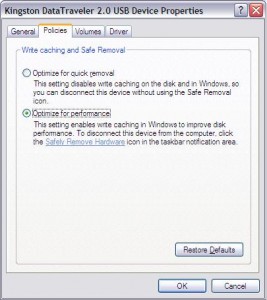
3) Then on the Hardware Tab select the USB or Pen Drive connected and then click Properties  >>  Policies Tab.
4) Now select "Optimize for Performance" Option rather than "Optimize for Quick Removal" and click Ok.
5) Now just Format the USB or Pen Drive with NTFS File System by Selecting Format Option from the Drop Down Menu of Formatting.
6) Now it is done.

How To Format An Unformatable Pen Drive Using Command Prompt


Hi to all guys . now i am going to share a very useful tips . as sometime we are unable in formatting a pen drives.as it may be affected by virus or any other problem . so we can not format .so today am going to share a very useful trick that how to format an unfoRmatable pendrives using dos command.

Follow The Given Below Steps for do this.

1. First insert your pen drive in any usb port.

2. Now go to run.

3.  Type this command format h: And the hit enter.

4.when you will hit enter then it will ask you that you want to format or not. Y orN !!! Hit Y and press enter
That's it..
Keep Visiting..

Revolver map

Rank

Linked

 
ExactSeek.com